

Documentation section
Fix “Model gpt-4o-mini not active” Error
If, after entering your OpenAI API key, you receive the error: “Model ‘gpt-4o-mini’ not active” — it means this model is not yet enabled in your OpenAI account.
How to Fix the Error
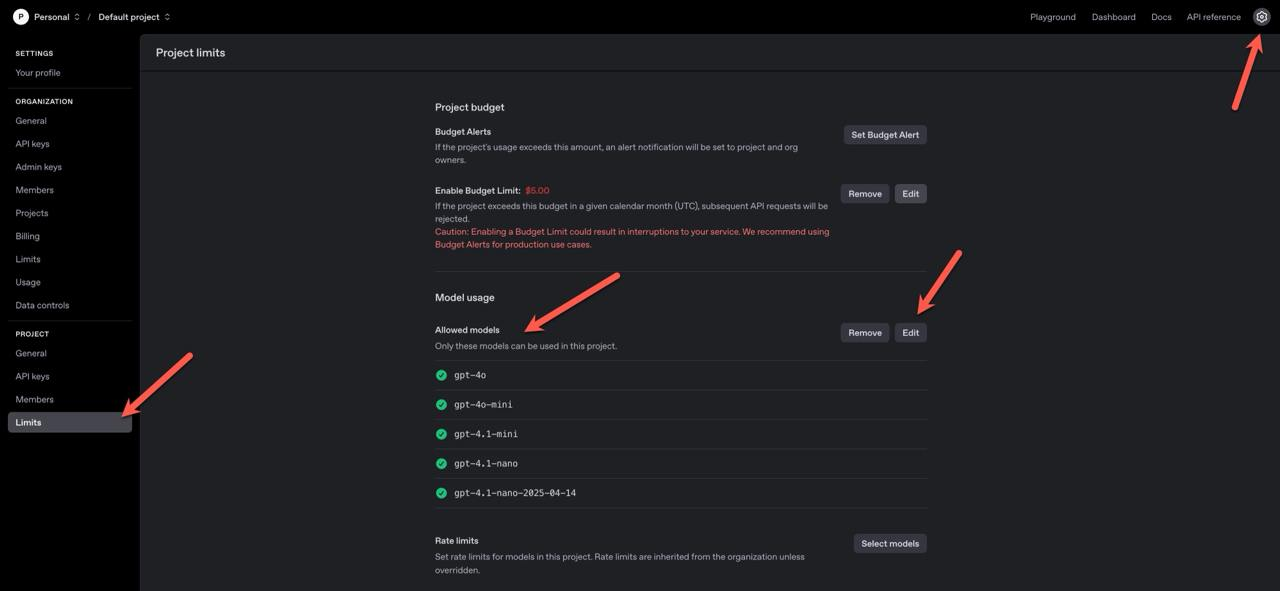
Step 1: Open OpenAI Settings
Go to the OpenAI Settings page.
Step 2: Enable the Model
In your OpenAI dashboard:
- Click the “Limits” tab.
- Scroll to the Model list section.
- Enable the gpt-4o-mini-2024-07-18 (or latest) model.
Step 3: Regenerate Your API Key
After enabling the model, create a new API key in your OpenAI account and add it again to the Sync Master app.
Step 4: Test the Connection
Once the new key is entered, test the integration — everything should now work correctly.
That’s it! Your OpenAI connection is now active and ready to process AI-powered operations in the app.
Table of contents
